The Savitzky-Golay filter smoothes a noisy signal by performing a polynomial fit over a sliding window. It is a close relative of LOESS, which also fits local polynomials, but gives more weight to the points near the center of the window.
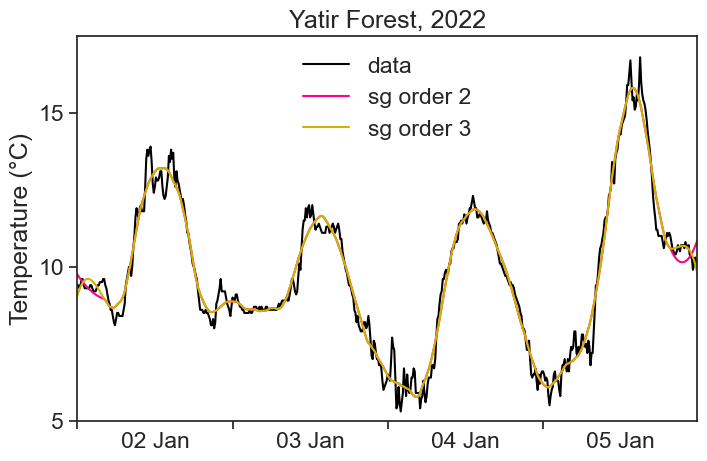
Polynomial fit of order 3, window size = 51 pts
Polynomial fit of order 2, window size = 51 pts
The simulations look different because the order of the polynomial makes a very different impression on us, but in reality the outcome of the two filterings is exactly the same, except near the edges of the data:
import stuff
import numpy as npimport matplotlib.pyplot as pltimport pandas as pdfrom matplotlib.dates import DateFormatterimport matplotlib.dates as mdatesimport datetime as dtimport matplotlib.ticker as tickerfrom scipy.signal import savgol_filterimport osimport scipyimport seaborn as snssns.set(style="ticks", font_scale=1.5) # white graphs, with large and legible letters# %matplotlib widget
define useful functions
# dirty trick to have dates in the middle of the 24-hour period# make minor ticks in the middle, put the labels there!# from https://matplotlib.org/stable/gallery/ticks/centered_ticklabels.htmldef centered_dates(ax): date_form = DateFormatter("%d %b") # %d 3-letter-Month# major ticks at midnight, every day ax.xaxis.set_major_locator(mdates.DayLocator(interval=1)) ax.xaxis.set_major_formatter(date_form)# minor ticks at noon, every day ax.xaxis.set_minor_locator(mdates.HourLocator(byhour=[12]))# erase major tick labels ax.xaxis.set_major_formatter(ticker.NullFormatter())# set minor tick labels as define above ax.xaxis.set_minor_formatter(date_form)# completely erase minor ticks, center tick labelsfor tick in ax.xaxis.get_minor_ticks(): tick.tick1line.set_markersize(0) tick.tick2line.set_markersize(0) tick.label1.set_horizontalalignment('center')
In the middle of the data the pink curve is hidden under the mustard one: the two filters are identical there. This is a general property of the filter: orders 2 and 3 give the same smoothing, and so do orders 4 and 5, and so on. They only differ in the first and last 25 points, where the window does not fit inside the data.
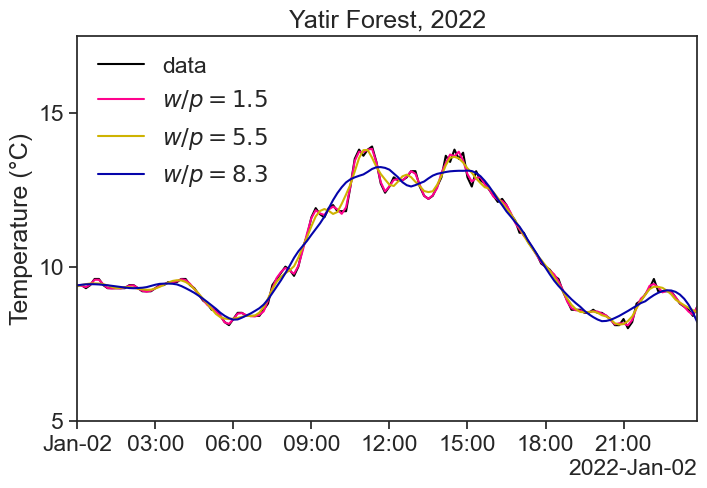
To really see the difference between window width and polynomial order, we need to play with their ratio,
The higher the ratio, the more aggressive the smoothing.
17.1 it’s a kernel too
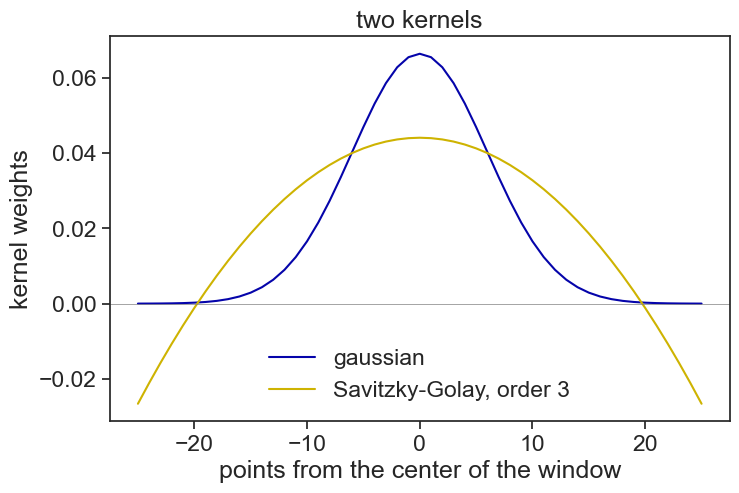
The Savitzky-Golay filter is also a sliding weighted average, just like the ones we saw in the previous pages: for each window, the result is the sum of the data points multiplied by weights, that is, by a kernel. Let’s compare the kernel of the Savitzky-Golay filter (51 points, order 3) with a gaussian kernel of the same width:
from scipy.signal import savgol_coeffsfrom scipy.signal.windows import gaussianwindow_width =51points = np.arange(window_width) - window_width //2# -25, ..., 25kernel_sg = savgol_coeffs(window_width, 3) # the weights of the Savitzky-Golay filterkernel_gauss = gaussian(window_width, 6)kernel_gauss = kernel_gauss / kernel_gauss.sum() # weights that add up to 1, like the Savitzky-Golay onesfig, ax = plt.subplots(figsize=(8,5))ax.plot(points, kernel_gauss, color='xkcd:royal blue', label='gaussian')ax.plot(points, kernel_sg, color='xkcd:mustard', label='Savitzky-Golay, order 3')ax.axhline(0, color='gray', lw=0.5)ax.set(xlabel="points from the center of the window", ylabel="kernel weights", title="two kernels")ax.legend(frameon=False);
Look at the tails of the Savitzky-Golay kernel: some of the weights are negative! This is how the filter manages to follow peaks and valleys much better than an ordinary running average, which flattens them.
There is a lot more about the Savitzky-Golay filter, but for our purposes this is enough. If you want some more discussion about how to choose the parameters of the filter, read this.