7 upsampling
In the previous chapter, we resampled from fine temporal resolution to a coarser one. This is also called downsampling. We will learn the upsampling now: how to go from coarse data to a finer scale.
Sadly, there is no free lunch, and we just can’t get data that was not measured. What to do then?
It’s best to consider a practical example.
7.1 Potential Evapotranspiration using Penman’s equation
We want to calculate the daily potential evapotranspiration using Penman’s equation. Part of the calculation involves characterizing the energy budget on soil surface. When direct solar radiation measurements are not available, we can estimate the energy balance by knowing the “cloudless skies mean solar radiation”, R_{so}. This is the amount of energy (MJ/m^2/d) that hits the surface, assuming no clouds. This radiation depends on the season and on the latitude you are. For Israel, located at latitude 32° N, we can use the following data for 30° (the closest latitude in the table):
dates = pd.date_range(start='2021-01-01', periods=13, freq='MS')
values = [17.46, 21.65, 25.96, 29.85, 32.11, 33.20, 32.66, 30.44, 26.67, 22.48, 18.30, 16.04, 17.46]
df = pd.DataFrame({'date': dates, 'radiation': values})
df = df.set_index('date')
df| radiation | |
|---|---|
| date | |
| 2021-01-01 | 17.46 |
| 2021-02-01 | 21.65 |
| 2021-03-01 | 25.96 |
| 2021-04-01 | 29.85 |
| 2021-05-01 | 32.11 |
| 2021-06-01 | 33.20 |
| 2021-07-01 | 32.66 |
| 2021-08-01 | 30.44 |
| 2021-09-01 | 26.67 |
| 2021-10-01 | 22.48 |
| 2021-11-01 | 18.30 |
| 2021-12-01 | 16.04 |
| 2022-01-01 | 17.46 |
fig, ax = plt.subplots()
ax.plot(df['radiation'], color='black', marker='d', linestyle='None')
ax.set(ylabel=r'radiation (MJ/m$^2$/d)',
       title="cloudless skies mean solar radiation for latitude 30° N")
ax.xaxis.set_major_locator(mdates.MonthLocator())
date_form = DateFormatter("%b")
ax.xaxis.set_major_formatter(date_form)
plt.gcf().autofmt_xdate()  # makes slanted dates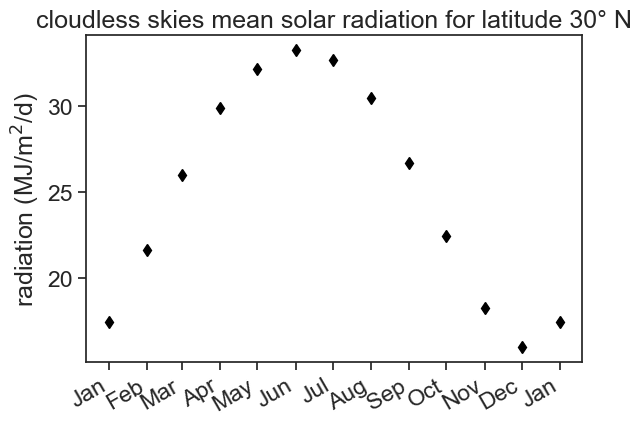
We only have 12 values for the whole year (the 13th row is just January again, in 2022, so that the interpolation we will do later has something to land on at the end of December), and we can’t use this dataframe to compute daily ET. We need to upsample!
In the example below, we resample the monthly data into daily data, and do nothing else. Pandas doesn’t know what to do with the new points, so it fills them with NaN.
| radiation | |
|---|---|
| date | |
| 2021-01-01 | 17.46 |
| 2021-01-02 | NaN |
| 2021-01-03 | NaN |
| 2021-01-04 | NaN |
| 2021-01-05 | NaN |
| 2021-01-06 | NaN |
| 2021-01-07 | NaN |
| 2021-01-08 | NaN |
| 2021-01-09 | NaN |
| 2021-01-10 | NaN |
| 2021-01-11 | NaN |
| 2021-01-12 | NaN |
| 2021-01-13 | NaN |
| 2021-01-14 | NaN |
| 2021-01-15 | NaN |
| 2021-01-16 | NaN |
| 2021-01-17 | NaN |
| 2021-01-18 | NaN |
| 2021-01-19 | NaN |
| 2021-01-20 | NaN |
| 2021-01-21 | NaN |
| 2021-01-22 | NaN |
| 2021-01-23 | NaN |
| 2021-01-24 | NaN |
| 2021-01-25 | NaN |
| 2021-01-26 | NaN |
| 2021-01-27 | NaN |
| 2021-01-28 | NaN |
| 2021-01-29 | NaN |
| 2021-01-30 | NaN |
| 2021-01-31 | NaN |
| 2021-02-01 | 21.65 |
| 2021-02-02 | NaN |
7.2 Forward/Backward fill
We can forward/backward fill these NaNs:
fig, ax = plt.subplots()
ax.plot(df['radiation'], color='black', marker='d', linestyle='None', label="original")
ax.plot(df_forw['radiation'], color='tab:blue', label="forward fill")
ax.plot(df_back['radiation'], color='tab:orange', label="backward fill")
ax.set(ylabel=r'radiation (MJ/m$^2$/d)',
       title="cloudless skies mean solar radiation for latitude 30° N")
ax.legend(frameon=False, fontsize=12)
ax.xaxis.set_major_locator(mdates.MonthLocator())
date_form = DateFormatter("%b")
ax.xaxis.set_major_formatter(date_form)
plt.gcf().autofmt_xdate()  # makes slanted dates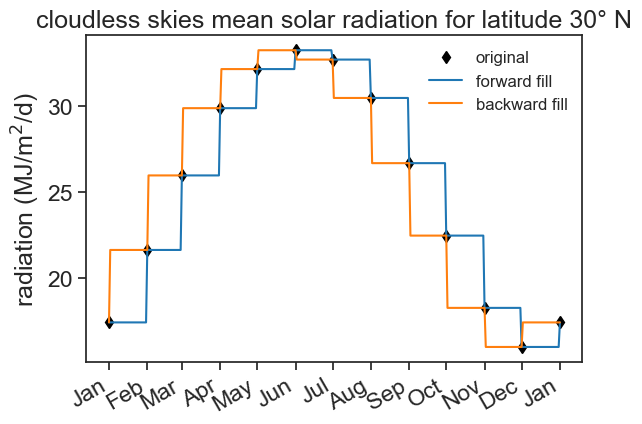
We first used asfreq, and then filled the NaN values with something. Instead of doing this in two steps, we can do the following:
| radiation | |
|---|---|
| date | |
| 2021-01-01 | 17.46 |
| 2021-01-02 | 17.46 |
| 2021-01-03 | 17.46 |
| 2021-01-04 | 17.46 |
| 2021-01-05 | 17.46 |
| ... | ... |
| 2021-12-28 | 16.04 |
| 2021-12-29 | 16.04 |
| 2021-12-30 | 16.04 |
| 2021-12-31 | 16.04 |
| 2022-01-01 | 17.46 |
366 rows × 1 columns
This does the job, but I want something better, not step functions. The radiation should vary smoothly from day to day. (Forward fill is not crazy, by the way: a monthly value describes the whole month, so holding it for the whole month is a reasonable first guess. But we know that the radiation does not jump from one day to the next.) Let’s use other kinds of interpolation.
7.3 Interpolation
fig, ax = plt.subplots()
ax.plot(df['radiation'], color='black', marker='d', linestyle='None', label="original")
ax.plot(df_linear['radiation'], color='tab:blue', label="linear interpolation")
ax.plot(df_cubic['radiation'], color='tab:orange', label="cubic interpolation")
ax.set(ylabel=r'radiation (MJ/m$^2$/d)',
       title="cloudless skies mean solar radiation for latitude 30° N")
ax.legend(frameon=False, fontsize=12)
ax.xaxis.set_major_locator(mdates.MonthLocator())
date_form = DateFormatter("%b")
ax.xaxis.set_major_formatter(date_form)
plt.gcf().autofmt_xdate()  # makes slanted dates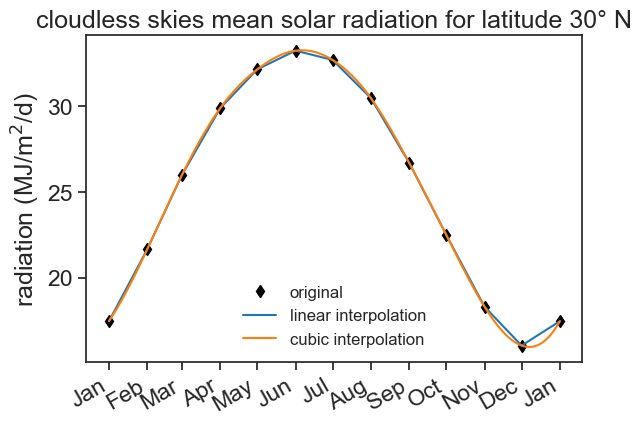
discussion
Look closely at the two curves around December. The cubic interpolation goes below the lowest data point. Smooth is not always better! How would you choose between linear and cubic interpolation for this problem?
There are many ways to fill NaNs and to interpolate. A nice detailed guide can be found here.
7.4 Where do we put the monthly values?
So far we put each monthly value on the first day of the month. But a monthly value describes the whole month, so the first day is not the best place for it, the middle of the month is. The FAO tables of solar radiation, for example, give the value for the 15th day of each month, as a good estimate of the monthly mean.
For forward fill the first day is the right place: the value holds for the whole month. For a smooth interpolation, the 15th is better. Let’s move each value to the 15th. The data repeats itself every year, so we can also add December of the year before, to have something to interpolate from at the beginning of January.
df_mid = df.copy()
df_mid.index = df_mid.index + pd.Timedelta(days=14)   # from the 1st to the 15th of each month
df_mid.loc[pd.Timestamp('2020-12-15')] = df['radiation'].iloc[11]   # December of the year before
df_mid = df_mid.sort_index()

# interpolate, and keep only the days of 2021
df_cubic_mid = df_mid['radiation'].resample('D').interpolate(method='cubic').loc['2021-01-01':'2021-12-31'].to_frame()
fig, ax = plt.subplots()
ax.plot(df_cubic['radiation'], color='tab:orange', label="values on the 1st")
ax.plot(df_cubic_mid['radiation'], color='tab:green', label="values on the 15th")
ax.set(ylabel=r'radiation (MJ/m$^2$/d)',
title="cubic interpolation")
ax.legend(frameon=False, fontsize=12)
ax.xaxis.set_major_locator(mdates.MonthLocator())
date_form = DateFormatter("%b")
ax.xaxis.set_major_formatter(date_form)
plt.gcf().autofmt_xdate() # makes slanted dates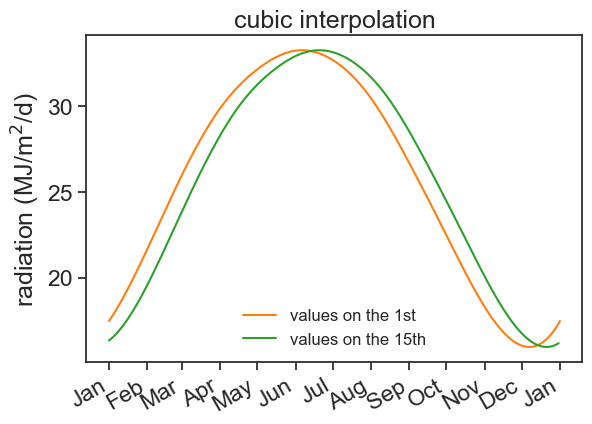
The two curves are about two weeks apart, which is the difference between “this value is for the 1st” and “this value is for the middle of the month”. For the rest of this chapter, we go back to the values on the 1st, to keep things simple.
7.5 Dealing with missing rows
There is a difference between missing rows and NaN values. The first is when we have a gap in the index, and the second is when we have a value that is missing.
Now we will produce two derivative datasets, one where the month of August is full of NaN values, the other where all the rows of the month of August are removed.
# True for the dates that are in August (index.month is the month number, from 1 to 12)
is_august = df_cubic.index.month.isin([8])

# first dataset: we remove the rows of August
# (the ~ flips True and False, so we keep the dates that are NOT in August)
df_missing = df_cubic[~is_august]

# second dataset: the rows of August stay, but their values become NaN
# we work on a copy, so the original df_cubic is not changed
df_august_nan = df_cubic.copy()
df_august_nan.loc[is_august] = np.nan

# see the difference between the two dataframes, starting at the end of July
print(df_missing['2021-07-29':])
print(df_august_nan['2021-07-29':])
radiation
date
2021-07-29 30.731457
2021-07-30 30.636204
2021-07-31 30.539054
2021-09-01 26.670000
2021-09-02 26.534642
... ...
2021-12-28 16.995662
2021-12-29 17.103029
2021-12-30 17.216164
2021-12-31 17.335133
2022-01-01 17.460000
[126 rows x 1 columns]
radiation
date
2021-07-29 30.731457
2021-07-30 30.636204
2021-07-31 30.539054
2021-08-01 NaN
2021-08-02 NaN
... ...
2021-12-28 16.995662
2021-12-29 17.103029
2021-12-30 17.216164
2021-12-31 17.335133
2022-01-01 17.460000
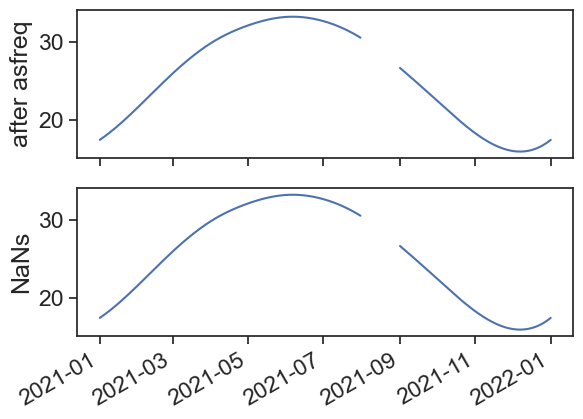
[157 rows x 1 columns]When plotting the data, we see that missing rows don’t produce gaps in the lineplot. Depending on the data, we would never know this just by looking at the plot!
fig, ax = plt.subplots(2, 1, sharex=True)
ax[0].plot(df_missing)
ax[0].set_ylabel("missing rows")
ax[1].plot(df_august_nan)
ax[1].set_ylabel("NaNs");
fig.autofmt_xdate()  # makes slanted dates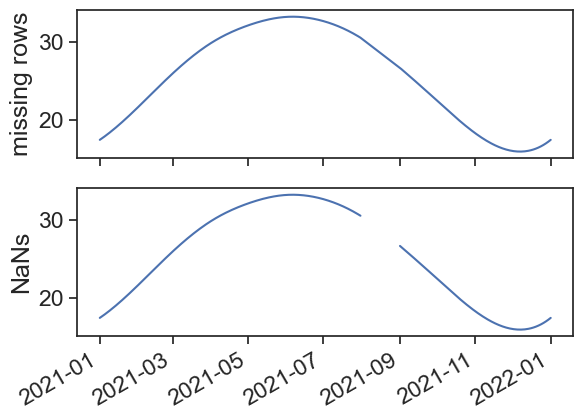
Use the asfreq method to fill the missing rows with NaNs.